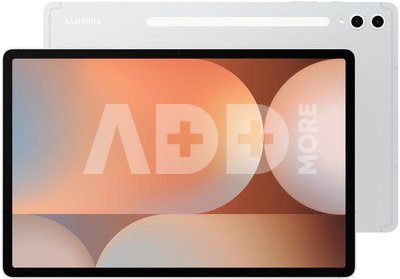
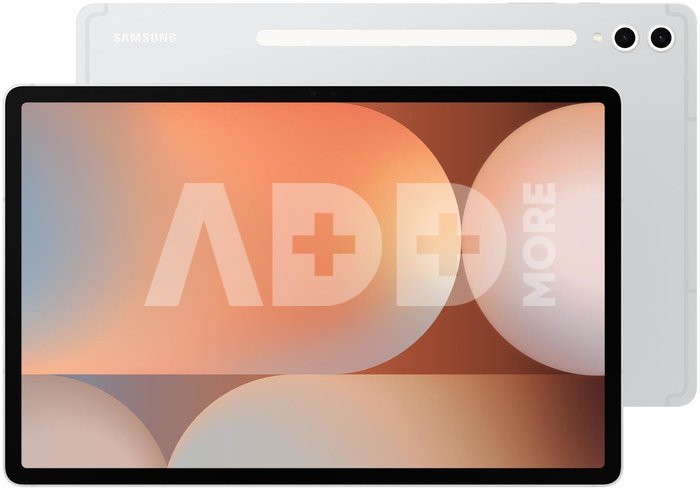
TABLET GALAXY TAB S10+ 5G/12" 512GB SILV SM-X826 SAMSUNG
Kodas: 14133EPB
Gamintojo kodas: SM-X826BZSPEUE
Įsiminti
Galaxy Tab S10+ 5G
Galaxy AI is here
For the first time ever, the Tab S10 series comes pre-installed with Galaxy AI, putting a powerful AI-powered graphics studio at your fingertips.
Iconic Design. Iconic Experience
The touch of innovation is evident in every detail, with new styling accents on the S Pen, charging area, and camera accents. Each one feels amazing to the touch.
Galaxy AI Optimized for a Large Screen
You've seen Galaxy AI before, but certainly not this way. This massive screen truly brings Galaxy AI features to life, maximizing your productivity and enjoyment.
Your Personal Note-Taking Assistant
Receive meeting notes while remaining fully engaged in the meeting: simply record the meeting, then transcribe the audio to text. Galaxy AI will format and summarize these notes, making note-taking effortless.
Edit in Split View
Formatting your notes becomes even easier in Split View. This feature helps you format while preserving the original.
Great philosophy just got easier.
Solve Math makes calculations simple by automatically calculating complex formulas. And with Handwriting Help, it can even decipher your handwriting.
Highlight to Search Google on a Big Screen
Explore the power of Highlight to Search Google on a bigger screen. Simply highlight, select, or click on an image or text to view Google search results. You can even get instant translations.
Dream it. Draw it. Done.
Use Sketch to Image to turn your rough sketches and swirls into works of art using AI and the magic of the S Pen. Drawing is more powerful than ever.
Turn on AI with a Tap
Press the Galaxy AI Key to unleash Galaxy AI and search for what you want. Your keyboard is now amazing.
Choose from Large or Extra Large.
Immerse yourself in deeper colors and true blacks, optimized for the Dynamic AMOLED 2X display. Immerse yourself in a cinematic experience with incredible resolution and exceptionally smooth interactions on what many consider the best display.
Keeps your game cool when the heat is on.
Elevate your gaming experience with an ultra-fast and efficient processor. When the action heats up, your device heats up less thanks to a larger vapor chamber cooling system designed for more effective cooling when you're gaming or watching movies for longer.
Repels dust. Withstands water.
A little water won't hurt you. In fact, the tablet can be submerged in clean water up to 1.5 meters deep for up to 30 minutes.
More power. More games. More videos.
Make the most of your battery life. Game for hours, watch your favorite shows, and then recharge to full capacity with super-fast charging.
Ultra-wide-angle camera to capture more of your world
With the ultra-wide-angle front camera, video calls will be perfectly framed. Record stunning HD videos and photos that you can edit directly on your tablet.
Exceptional on their own. Perfect together.
Get the most out of your Galaxy Tab S10 by connecting it to other Galaxy products. They work seamlessly together, so everything you do runs smoothly and naturally.
The best apps at your fingertips
You'll find amazing apps like LumaFusion and Clip Studio Paint pre-installed to spark your creativity, but you can easily download more, including PicsArt, Sketchbook, Noteshelf3, and Wall Street Journal.
Pristatymo laikas
10-14 d.d.
Aptarkite su konsultantu Kaune
Neturime
Kaunas Adresas: Birželio 23-iosios g. 23g Darbo laikas: I-V 09:00 - 18:00 VI-VII nedirba Telefonas: +370 674 59488
Aptarkite su konsultantu Klaipėdoje
Neturime
Klaipėda Adresas: Taikos pr. 17 Darbo laikas: I-V 10:00 - 19:00 VI 10:00 - 14:00 VII nedirba Telefonas: +370 604 43972
1. Kaip pasirinkti tinkamą planšetinį kompiuterį pagal asmeninius poreikius?
Tinkamo planšetinio kompiuterio pasirinkimas priklauso nuo individualių poreikių ir naudojimo scenarijaus. Kai renkatės planšetinį kompiuterį, atkreipkite dėmesį į šiuos veiksnius: 1) Naudojimo tikslas: Jei norite planšetę naudoti darbui, rinkitės modelį su galingu procesoriumi ir pakankama atmintimi. Jei jums reikia planšetės daugiau pramogoms ir naršymui internete, galite pasirinkti lengvesnį ir plonesnį variantą. 2) Operacinė sistema: Pasirinkite planšetę su operacine sistema, kuri jums yra pati patogi – Android, iOS (iPad) arba Windows. Kiekviena turi savo privalumų ir trūkumų. 3) Ekrano dydis ir raiška: Jei jums svarbus didelis ir aiškus ekranas, rinkitės planšetę su didele raiška ir kokybišku ekranu. Tai svarbu, ypač jei planšetę naudosite žiūrėdami filmus arba redaguodami nuotraukas. 4) Baterijos tarnavimo laikas: Atkreipkite dėmesį į baterijos tarnavimo laiką, ypač jei planšetę ketinate naudoti ilgai kelionėse arba darbe. 5) Priedai ir funkcijos: Kai kurios planšetės turi platus priedų pasirinkimą – nuotolinį rašiklį, klaviatūrą, dėklą ir kt. Patikrinkite, ar pasirinktas modelis turi norimas funkcijas. Analizuokite savo poreikius ir vykdykite kruopštų tyrimą apie rinkoje esančius variantus, kad pasirinktumėte planšetinį kompiuterį, atitinkantį jūsų lūkesčius.
2. Kaip planšetiniai kompiuteriai skiriasi pagal operacinę sistemą?
Planšetiniai kompiuteriai skiriasi pagal operacinę sistemą, kuri yra esminis jų veikimo elementas. Pagrindinės planšetinių kompiuterių operacinės sistemos yra Android, iOS (naudojama „iPad“) ir Windows. Android operacinė sistema, sukurta „Google“, naudoja dauguma ne „Google“ kompanijos gaminamų planšetinių kompiuterių. Ši sistema yra atvira, taip pat palaiko gausybę programų iš „Google Play“ parduotuvės. iOS yra „Apple“ operacinė sistema, kuri naudojama „iPad“ planšetiniuose kompiuteriuose. Tai uždara operacinė sistema, sukurta specifiškai „Apple“ produktams, suteikianti didelę našumo ir vartotojo patirties integraciją. Kai kurie planšetiniai kompiuteriai naudoja „Windows“ operacinę sistemą, suteikiančią daugiau funkcionalumo ir suderinamumo su „Windows“ darbalaukio aplikacijomis. Tai yra tinkamas pasirinkimas, jei jums reikia darbo su daugeliu standartinių programų ir norite planšetinio kompiuterio, kuris gali veikti kaip nešiojamas kompiuteris. Skirtingos operacinės sistemos pasiūlo unikalų programų prieinamumą ir funkcijas, todėl vartotojai turėtų pasirinkti pagal asmeninius poreikius ir prioritetus.

















Atsiliepimai
0 vidutinis įvertinimas (0 įvertinimų)