
+370 462 46444
I-V 10:00-19:00
VI 10:00-14:00

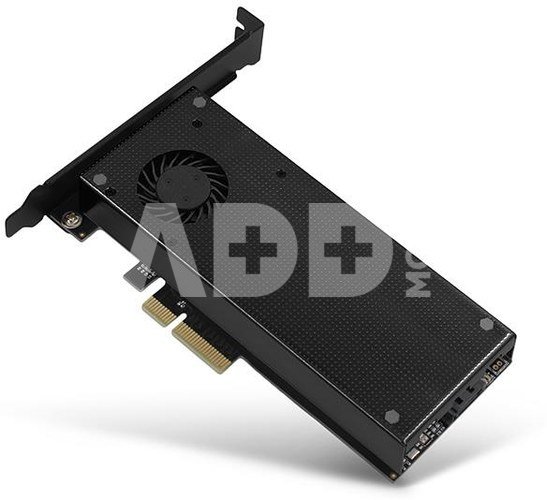
SSD ACC ADAPTER NVME/SATA/M.2/PCIE SP&LP PCEM2-DC AXAGON

SSD ACC ADAPTER NVME/SATA/M.2/PCIE SP&LP PCEM2-DC AXAGON
Kodas: 10547EPB
Gamintojo kodas: PCEM2-DC
Įsiminti
EU sandėlyje
Pristatymas 10-14 d.d.
EAN
8595247903853
Pasirinkite savybes
Spalva
28.99
Nuomoti(nuo €/diena)
Pratęsta garantija
Prekės draudimas

Nemokamai atsiimkite Kaune, parduotuvėje (Birželio 23-iosios g. 23g) Liepos 28 d.

Nemokamai atsiimkite Klaipėdoje, parduotuvėje (Taikos pr. 17) Liepos 28 d.

Pristatysime į namus per kurjerių tarnybą Liepos 30 d.

Turite klausimų? +370 462 46444 Siųskite užklausą

AprašymasSSD ACC ADAPTER NVME/SATA/M.2/PCIE SP&LP PCEM2-DC AXAGON aprašymas

The internal AXAGON PCEM2-DC adapter allows to connect up to two M.2 SSDs to a desktop. So, it is an ideal choice for upgrading a desktop that has no M.2 slot.

The adapter supports the use of both one-sided and double-sided SATA and NVMe (PCI Express) M.2 SSDs. The reduction does not limit SSD capacity, and any M.2 cards with a length up to 110 mm can be used. The simultaneous operation of both disks is commonplace.

Thanks to PCI-Express 3.0 4-lane interface compatible with x4, x8 and x16 slots, a speed as high as 8GBps can be achieved. When compared to standard SATA SSDs, bit rates of NVMe SSDs are many times higher.

The high quality card design, including copper-plated vents, assists in a better dissipation of heat generated during the M.2 SSDs operation. A metal cover with fan and an attached passive cooler, incl. thermal pads, assist in M.2 SSDs cooling. It results in an ideal combination of passive and active cooling of M.2 SSDs and heat removal. Thanks to the cooling and temperature reduction by up to 35°C, it is possible to use the maximum power of deployed SSDs.

Double blue LEDs indicate either power on or data transfer in the M.2 slot. The package also contains a low profile blanking plug for mounting the adapter into low profile cases.

Input:
PCI-Express 3.0 interface compatible with PCI-Express 1.0a / 1.1 / 2.0 / 2.1.
Number of 4-Lane lines, compatible with x4 / x8 / x16 PCIe slots.
Bandwidth of 4-Lane PCI-Express 3.0 bus of up to 8 GB/s (two-way).
SATA connector to connect the motherboard when a SATA M.2 SSD is used.
To achieve the best possible bit rates, the use of a SATA 6G controller is recommended.
 
Output:
NGFF 75-pin M-key slot to install the  NVMe (PCI-Express) M.2 SSDs.
NGFF 75-pin B-key slot to install the  SATA (AHCI) M.2 SSDs.

Other features:
Full Plug and Play support.
Support of M.2 disks of any size - 2230, 2242, 2260, 2280, 22110 mm.
Support of M.2 disks of any capacity.
Simultaneous operation of both disks.
Support of both one-sided and double-sided M.2 disks.
A better dissipation of heat from M.2 SSDs thanks to copper-plated vents.
A metal cover with fan supplied from the card.
An auxiliary fin cooler to provide a superior cooling option for M.2 SSD.
Support of booting from SSD card.
No drivers need to be installed.
Card dimensions: 140 x 68 x 17 mm, weight 111 g.
Note: CAUTION! The adapter allows to insert B+M-key disks in both M.2 slots. It is important to check the disk parameters, i.e. to make sure whether the disk is designed for SATA or NVMe (PCI-Express) interface, and to connect it to the right slot. SATA SSDs are connected to B-key slot, NVMe SSDs are connected to M-key slot.

Power supply:
The adapter is directly supplied from PCI-Express bus; no external power supply is needed.
The system of dual power supply ensures a sufficient power for connected M.2 SSDs.
In addition, the system of redundant power supply reduces the adapter thermal load.

Supported operating systems:
MS Windows 7 / 8 / 8.1 / 10, Windows Server 2008 R2 / 2012 / 2016 (all 32-bit as well as 64-bit versions of OS Windows are supported), Linux with kernel 2.6.31 and higher.
Note: When operating under Windows 7, contact the manufacturer of the M.2 SSD to find whether this OS is supported, especially when NVMe disks are used.

Package contains:
PCI-Express adapter with a standard blanking plug and a cover with fan,
passive cooler for M.2 SSD and 2 thermal pads,
low profile blanking plug,
mounting material and a screwdriver,
printed installation manual CZ / EN / DE / ESP / FR / HU / IT / PL / RO / RU / SK / BG,
packed in a cardboard box with clearly indicated parameters.

Garantinis laikotarpis 24 mėnesių

Svoris 0.19 kg

Pristatymo laikas 10-14 d.d.

Aptarkite su konsultantu Kaune

Neturime Kaunas Adresas: Birželio 23-iosios g. 23g Darbo laikas: I-V 09:00 - 18:00 VI-VII nedirba Telefonas: +370 674 59488
Kaunas

Aptarkite su konsultantu Klaipėdoje

Neturime Klaipėda Adresas: Taikos pr. 17 Darbo laikas: I-V 10:00 - 19:00 VI 10:00 - 14:00 VII nedirba Telefonas: +370 604 43972
Klaipėda
Specifikacija
Gamintojas(?) AXAGON
Garantinis laikotarpis 24 mėnesių
Svoris 0.19 kg
Pristatymo laikas 10-14 d.d.
Prekės kodai

10547EPB PCEM2-DC 8595247903853

Atsiliepimai

0 vidutinis įvertinimas (0 įvertinimų)

 0
 0
 0
 0
 0

Palikite atsiliepimą

Vertinti gali tik prisijungę vartotojai.

Palikti pirkėjų atsiliepimai (0)

Atsiliepimų kol kas nėra. Būk pirmas!

1. Kaip pasirinkti tinkamą klaviatūrą ir pelę savo kompiuteriui?

Norint pasirinkti tinkamą klaviatūrą ir pelę savo kompiuteriui svarbu atsižvelgti į asmeninius poreikius ir naudojimo būdą. Klaviatūros pasirinkimas priklauso nuo jūsų darbo pobūdžio, ergonominių poreikių ir asmeninio komforto. Jei daug laiko praleidžiate rašydami, svarbu rinktis klaviatūrą su maloniu klavišų paspaudimu ir ergonomišku dizainu, kuris sumažina rankų ir pečių įtempimą. Specializuotos klaviatūros, kuriose yra papildomų funkcijų, pavyzdžiui, programuojamų klavišų arba spalvotų šviesų, gali pagerinti naudotojo patirtį. Pelės pasirinkimas gali priklausyti nuo jūsų darbo pobūdžio – grafikos dizaineriams arba žaidimų entuziastams gali reikėti aukštos raiškos ir didelio jautrumo pelės. Ergonominės pelės su daugiau nei vienu mygtuku gali palengvinti darbą su įvairiomis programomis. Be to, svarbu atkreipti dėmesį į sąveiką su jūsų kompiuterio tipu (ar tai belaidė, ar laidinė klaviatūra ir pelė) bei patogią ergonomiją. Prieš perkant, būtina išbandyti klaviatūrą ir pelę, kad įsitikintumėte, jog jos atitinka jūsų poreikius ir yra patogios naudoti.

2. Kokios yra geriausios aušinimo sistemos kompiuteriui?

Geriausią aušinimo sistemą galima pasirinkti atsižvelgiant į kompiuterio naudojimo scenarijų. Vandens aušinimas dažnai būna efektyvus, ypač esant dideliam apkrovimui, o oro aušinimas yra paprastesnis ir pigesnis variantas. Keletas populiarių aušinimo būdų apima: 1) Oro aušinimas (Air Cooling): Paprasta ir ekonominė alternatyva, naudojanti didelius ventiliatorius, šilumos vamzdžius ir radiatorius. Šis būdas tinka vidutinio ir žemo lygio naudotojams. 2) Vandens aušinimas (Liquid Cooling): Ši sistema naudoja specialų šilumos siurblių ir vamzdžių rinkinį, leidžiantį aušinti komponentus vandeniu. Tai dažnai naudojama su pažangesniais procesoriais ir vaizdo plokštėmis, tačiau reikalauja tikslaus diegimo. 3) Phase Change Cooling: Labai efektyvi sistema, kuri naudoja šaltus dujų ciklus, kad transformuotų dujas į skysčius ir atvirkščiai. Tai brangesnė alternatyva, bet suteikia itin efektyvų aušinimą. 4) Termoelektrinė (Peltier) sistema: Šio tipo sistema naudoja Peltier elementus, kurie gali perkelti šilumą iš vienos pusės į kitą, priklausomai nuo elektros srovės krypties. Ši sistema gali būti derinama su kitomis aušinimo metodikomis. Geriausią pasirinkimą lemia naudojimo atvejis, biudžetas ir pageidaujamas efektyvumas. Priklausomai nuo to, ar norite paprasto, bet patikimo oro aušinimo, ar pažangesnės technologijos su vandeniu, turite rinktis tai, kas geriausiai atitinka jūsų poreikius.