

+370 462 46444
I-V 10:00-19:00
VI 10:00-14:00

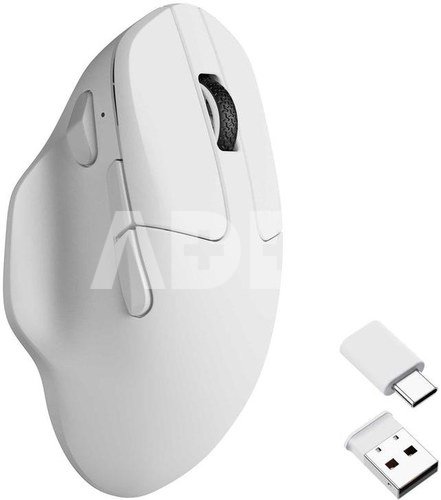
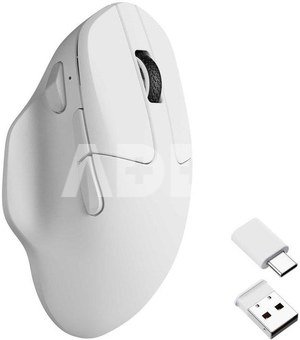
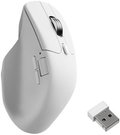
MOUSE USB OPTICAL WRL M7/WHITE M7-A3 KEYCHRON

MOUSE USB OPTICAL WRL M7/WHITE M7-A3 KEYCHRON
Kodas: 14480EPB
Gamintojo kodas: M7-A3
Įsiminti
EU sandėlyje
Pristatymas 1-4 d.d.
Pasirinkite savybes
Spalva
63.00
Nuomoti(nuo €/diena)
Pratęsta garantija
Prekės draudimas

Nemokamai atsiimkite Kaune, parduotuvėje (Birželio 23-iosios g. 23g) Liepos 01 d.

Nemokamai atsiimkite Klaipėdoje, parduotuvėje (Taikos pr. 17) Liepos 01 d.

Pristatysime į namus per kurjerių tarnybą Liepos 03 d.

Turite klausimų? +370 462 46444 Siųskite užklausą

AprašymasMOUSE USB OPTICAL WRL M7/WHITE M7-A3 KEYCHRON aprašymas

Keychron M7 wireless Mouse has the best PixArt 3950 and PixArt 3395 sensor. It supports 2.4 GHz, Bluetooth, and a USB wired connection.

Please drop your email on "Notify Me When Available" if the product model is out of stock.

No discount codes can be used for M7.

Keychron M7

Wireless Optical Mouse

Keychron M7 packs the best features in an ultra-lightweight body at 66g. It supports wireless 2.4 GHz and Bluetooth connection, ideal for any scenario, whether at work, gaming, or on the go, and offers ultimate performance to maximize productivity!

The Strongest Mouse Sensor

The top-tier optical sensor delivers flawless sensitivity and pinpoint precision, ensuring seamless response to every hand movement for ultimate control in gaming scenarios or professional tasks.

8000 Hz Polling Rate Option

Setting the mouse at a 8000 Hz polling rate can result in a high-speed signal transmittance between the mouse and the connected device. More responsive cursor movements captured with faster trigger response guarantees unparalleled performance, securing your triumph when it truly counts!

More Customization on The Keychron Launcher

Just click, save, and turn it off, the online Launcher web app allows for easy personalization. You can modify keys, set shortcuts, create dedicated macros, or do professional settings for LOD, polling rate, DPI, etc. Besides, it provides 5 on-board memory profiles for your access to different apps or computers.

Anytime, Anywhere Access

Keychron Launcher is a web page configurator that you can use in the office, school, lab, or government department—anywhere with internet access. Configure your mouse online anytime without the need to download or install files. No hassle, no trouble.

Compatible with All Platforms

As a web-based tool, Keychron Launcher supports all operating systems. Personalize and program your mouse on Windows, macOS, Linux, and more. Enjoy unprecedented flexibility with compatibility across Chrome, Edge, and Opera browser.

Always Up to Date

Keychron Launcher is continuously updated, ensuring you always have access to the latest version. There's no need to download updates or wait for installations.

Stable & Ultra-low Latency Response

2.4 GHz and Bluetooth

With cutting-edge 2.4 GHz frequency wireless connectivity, the M7 gives you extremely low latency and quick response for gaming and the office. M7 8K also offers a stable 5.3 Bluetooth connection for even more variety in your wireless connectivity.

Peak Performance For Every Scenario

Precise sensors, extremely low latency wireless connectivity, and high polling rate give you the best performance for both office , gaming or even on the go.

The Ultimate Ergonomic Design

The ergonomic design of M7, featuring a smooth curve on the top and a thumb rest on the side, conforms more closely to the contour of your palm, ensuring a comfortable grip over extended periods.

Lightweight at 66g

Lightweight at 66g, it offers just the right amount of lightness, flexibility, and effortlessness to hold in your hand for extended use.

Up To 140 Hours

Equipped with the 600 mAh battery, M7 offer impressive continuous working times across its versions:
· Up to 140 hours in Bluetooth mode (8K version)
· Up to 70 hours (1K version)

Huano 80M Micro Switch

Huano 80M micro switch deliver clean clicks feeling, and the lifespan is up to 80 million clicks

Adjust Without Software

External DPI & polling rate buttons design, you can adjust DPI & polling rate without software

Macro Button

M7 has an extra macro button on the left side, and all buttons are programmable in the dedicated software.

  • The Strongest Mouse Sensor
  • 8000 Hz Polling Rate Option
  • Anytime, Anywhere Access
  • Compatible with All Platforms
  • Always Up to Date

Pristatymo laikas 1-4 d.d.

Aptarkite su konsultantu Kaune

Neturime Kaunas Adresas: Birželio 23-iosios g. 23g Darbo laikas: I-V 09:00 - 18:00 VI-VII nedirba Telefonas: +370 674 59488
Kaunas

Aptarkite su konsultantu Klaipėdoje

Neturime Klaipėda Adresas: Taikos pr. 17 Darbo laikas: I-V 10:00 - 19:00 VI 10:00 - 14:00 VII nedirba Telefonas: +370 604 43972
Klaipėda
Specifikacija
Pristatymo laikas 1-4 d.d.
Prekės kodai

14480EPB M7-A3 4895248875147

Atsiliepimai

0 vidutinis įvertinimas (0 įvertinimų)

 0
 0
 0
 0
 0

Palikite atsiliepimą

Vertinti gali tik prisijungę vartotojai.

Palikti pirkėjų atsiliepimai (0)

Atsiliepimų kol kas nėra. Būk pirmas!

1. Kaip pasirinkti tinkamą kompiuterinę pelę pagal savo poreikius?

Tinkamos kompiuterinės pelės pasirinkimas priklauso nuo individualių poreikių ir naudojimo įpročių. Keletas svarbių aspektų, kuriuos turėtumėte įvertinti: 1) Pelės tipas: Egzistuoja įvairių tipų pelės, įskaitant optinę, lazerinę ir žemėlapių peles. Lazerinės pelės tinka skirtingiems paviršiams, o žemėlapių pelės gali būti naudingos žaidimams. 2) Pelės jautrumas: Jautrumas nusako, kaip greitai pelė reaguoja į judėjimą. Žaidimams dažnai geriau tinka pelės su reguliuojamu jautrumu, leidžiančiu prisitaikyti prie skirtingų poreikių. 3) Dizainas ir forma: Ergonominis dizainas yra svarbus, ypač jei ilgai naudojate pelę. Rinkitės pelę, kuri gerai tinka jūsų rankai ir leidžia patogiai judėti. 4) Papildomos funkcijos: Kai kurios pelės turi papildomas funkcijas, tokias kaip programuojami mygtukai, RGB apšvietimas arba daugiafunkciniai elementai. Šios funkcijos gali pagerinti naudojimo patirtį. 5) Belaidė ar laidinė: Belaidės pelės suteikia didesnę judrumo laisvę, tačiau laidinės pelės dažnai nereikalauja baterijų keitimo ir turi mažesnį delsimo laiką. Atsižvelgiant į šiuos veiksnius, galėsite pasirinkti kompiuterinę pelę, kuri atitinka jūsų poreikius ir užtikrina patogią naudojimo patirtį.

2. Kokie yra skirtingi pelių tipai ir kokie yra jų privalumai?

Yra kelios pagrindinės pelių kategorijos, įskaitant optines, lazerines, ir šiuolaikines bevieles peles. Optinės pelės yra geresnės ant lygaus paviršiaus, o lazerinės daugiau tinka nelygiems paviršiams ir yra jautresnės judesio sekimui. Bevielinės pelės siūlo didesnę judumo laisvę, kurios dažnai reikalingos žaidėjams arba žmonėms, dirbantiems nuotoliniu būdu. Optinės pelės naudoja šviesos diodą (LED) arba infraraudoną šaltinį, kad nustatytų judėjimą ant paviršiaus. Optinės pelės veikia gerai įvairiose aplinkose ir yra ekonominės. Lazerinė pelė yra panaši į optinę, tačiau naudoja lazerį judėjimui nustatyti. Gali dirbti ant daugiau paviršių ir tinka žaidimams, kur reikalingas didesnis jautrumas. Kiekvienas pelės tipas turi savo privalumus. Optinės pelės yra pigios ir tinka įprastam naudojimui, lazerinės pelės yra daugiafunkcinės. Pasirinkimas priklauso nuo individualių poreikių ir naudojimo scenarijaus.