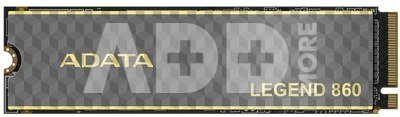
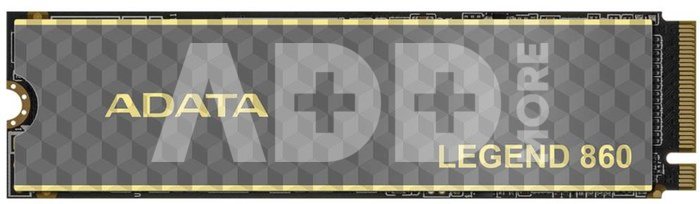
ADATA SSD LEGEND 860 500GB M.2 PCIe Gen.4x4 R/W 5000/3000
Kodas: 141379223VOK
Gamintojo kodas: SLEG-860-500GCS
Įsiminti
LEGEND 860
Imagine it and get it instantly
The LEGEND 860 boasts sequential read/write speeds of 6000/5000 MB per second, which are 3x faster than standard PCIe Gen3 SSDs and 10x faster than SATA SSDs, and is backward compatible with current PCIe 3.0 platforms. This drive delivers excellent performance for mid- to high-end productions such as film and television animation, machine learning, and product modeling!
Enhance your PS5 experience
The LEGEND 860 utilizes the PCIe 4.0 transmission interface and can be installed in the PS5 as a secondary drive to address the issue of insufficient PS5 storage. The LEGEND 860 not only fits perfectly into the PS5's drive slot, but also ensures smooth, lag-free gaming, even with AAA titles.
*According to Sony, even though read and write speeds exceed the official standard, not all games will achieve the same performance as the PS5's built-in SSD.
**When used with the PS5, sequential read speeds are 5000 MB/s for all capacities.
Even more elite
The LEGEND 860 uses SLC caching and HMB (Host Memory Buffer) technology to provide superior caching, and features LDPC (Low Density Parity Check Code) error correction, ensuring accurate data transmission and file security.
5-Year Warranty for Peace of Mind
LEGEND series SSDs are crafted from carefully selected, high-quality components designed to stand the test of time. The LEGEND 860 has undergone rigorous testing and quality control and is backed by a 5-year warranty for peace of mind!
Additional SSD Toolbox Software for Real-Time Health Monitoring
SSD Toolbox provides access to the latest firmware for peak performance, and with S.M.A.R.T. (Self-Monitoring, Analysis, and Reporting Technology), allows you to monitor the health and remaining lifespan of your SSD, as well as check the current operating temperature and memory capacity, allowing you to stay on top of your SSD's health.
Pristatymo laikas
10-14 d.d.
Aptarkite su konsultantu Kaune
Neturime
Kaunas Adresas: Birželio 23-iosios g. 23g Darbo laikas: I-V 09:00 - 18:00 VI-VII nedirba Telefonas: +370 674 59488
Aptarkite su konsultantu Klaipėdoje
Neturime
Klaipėda Adresas: Taikos pr. 17 Darbo laikas: I-V 10:00 - 19:00 VI 10:00 - 14:00 VII nedirba Telefonas: +370 604 43972
1. Kodėl pasirinkti išorinį SSD diską palyginti su HDD?
Išoriniai SSD diskai palyginti su HDD siūlo keletą privalumų, įskaitant didelį perdavimo greitį, patvarumą ir mažą energijos suvartojimą. SSD naudoja flash atmintį, todėl skaitymo/rašymo operacijos yra kur kas greitesnės nei tradicinėse HDD su sukamaisiais diskais. Tai ypač aktualu perkant išorinį diską užkrovimui, programoms ir didelių failų perkėlimui. Be to, SSD yra mechanikos dalies nebenešiojantis, mažiau pažeidžiamas smūgiams ar vibracijai, todėl jie patvarūs ir patikimi ne tik kelionėse, bet ir ilgalaikiam duomenų saugojimui. Taip pat, SSD diskai yra tylūs ir suvartoja mažiau energijos, kas yra svarbu nešiojamųjų kompiuterių naudotojams.
2. Kaip pasirinkti tinkamą išorinio SSD talpą?
Renkantis tinkamą išorinio SSD disko talpą, svarbu atsižvelgti į asmeninius poreikius ir naudojimo scenarijus. Vidutiniam vartotojui, turinčiam daug nuotraukų arba muzikos, gali pakakti 500 GB arba 1 TB talpos, o profesionalams, dirbantiems su dideliais vaizdo įrašų failais, gali reikėti 2 TB ar net daugiau. Apibrėžkite savo talpinimo poreikius: kiek duomenų ketinate saugoti. Atkreipkite dėmesį į perdavimo greitį - jei jums reikia greito duomenų perdavimo, rinkitės SSD su aukštu skaitymo/rašymo greičiu. Tikrinkite, ar išorinis SSD yra suderinamas su jūsų įrenginiais, ir įsitikinkite, kad jis turi reikiamus prievadus (pvz., USB-C ar Thunderbolt).

















Atsiliepimai
0 vidutinis įvertinimas (0 įvertinimų)