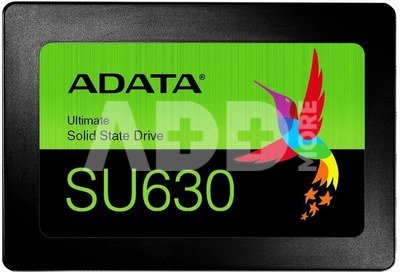
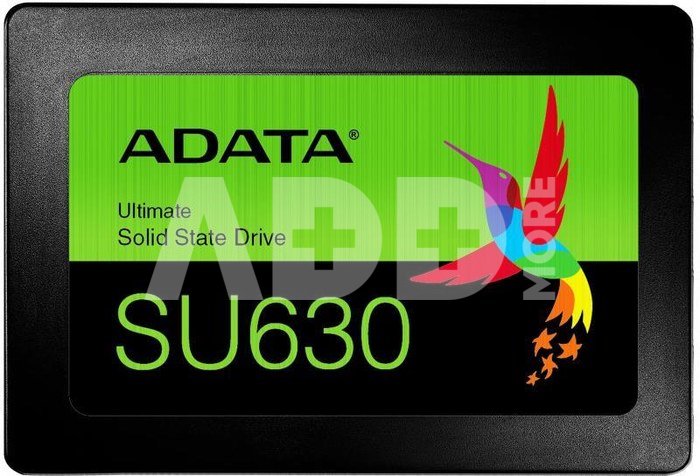
ADATA SU630SS 240GB BLACK RETAIL
Kodas: 34737RME
Gamintojo kodas: ASU630SS-240GQ-R
Įsiminti
If you are thinking of replacing your hard drive with SSD, you do not need to look any further, because the ADATA SU630 hard drive is the product for you. SSD with next-generation QLC 3D NAND flash memory offers amazing quality and excellent performance. It is also equipped with great features such as LDPC ECC technology.
3D SSD QLC large capacity at an affordable price
With the flash memory of QLC 3D NAND with 240 GB capacity and attractive price, the SU630 is a great solution for users who are thinking of converting the hard disk to SSD, both for the storage disk and the boot disk.
More efficiency thanks to dynamic SLC buffering
Thanks to dynamic SLC buffering, NAND flash memory works in SLC (single-level cell) mode and increases performance. As a consequence, the read / write speed of the SU630 disk reaches as much as 520/450 MB / s, which ensures smoother and faster launching and uploading and downloading of files.
Improved data integrity
Thanks to the support of LDPC (Low-Density Parity-Check) technology, the SU630 disc detects and repairs errors, ensuring data integrity and longer life.
Stronger, quieter and more reliable
Due to the lack of mechanical components, SSD drives are more durable than hard drives. They are characterized by greater resistance to shocks, vibrations (1500G / 0.5 ms) and extreme temperatures (from 0 ° C to 70 ° C), thus ensuring better data protection. In addition, SSDs work quietly and consume less power.
SSD Toolbox and Migration Utility
After buying the SU630 drive, the user can download the SSATA Toolbox and Migration Utility from ADATA free of charge! The SSD Toolbox program allows you to manage your SU630 drive and monitor factors such as drive status, consumption level and service life. The Migration Utility is especially useful for users switching from hard disk to SSD, because it enables easy and convenient data backup and migration, which also includes the operating system.
Pristatymo laikas
0-4 d.d.
Aptarkite su konsultantu Kaune
Neturime
Kaunas Adresas: Birželio 23-iosios g. 23g Darbo laikas: I-V 09:00 - 18:00 VI-VII nedirba Telefonas: +370 674 59488
Aptarkite su konsultantu Klaipėdoje
Neturime
Klaipėda Adresas: Taikos pr. 17 Darbo laikas: I-V 10:00 - 19:00 VI 10:00 - 14:00 VII nedirba Telefonas: +370 604 43972
1. Kodėl pasirinkti išorinį SSD diską palyginti su HDD?
Išoriniai SSD diskai palyginti su HDD siūlo keletą privalumų, įskaitant didelį perdavimo greitį, patvarumą ir mažą energijos suvartojimą. SSD naudoja flash atmintį, todėl skaitymo/rašymo operacijos yra kur kas greitesnės nei tradicinėse HDD su sukamaisiais diskais. Tai ypač aktualu perkant išorinį diską užkrovimui, programoms ir didelių failų perkėlimui. Be to, SSD yra mechanikos dalies nebenešiojantis, mažiau pažeidžiamas smūgiams ar vibracijai, todėl jie patvarūs ir patikimi ne tik kelionėse, bet ir ilgalaikiam duomenų saugojimui. Taip pat, SSD diskai yra tylūs ir suvartoja mažiau energijos, kas yra svarbu nešiojamųjų kompiuterių naudotojams.
2. Kaip pasirinkti tinkamą išorinio SSD talpą?
Renkantis tinkamą išorinio SSD disko talpą, svarbu atsižvelgti į asmeninius poreikius ir naudojimo scenarijus. Vidutiniam vartotojui, turinčiam daug nuotraukų arba muzikos, gali pakakti 500 GB arba 1 TB talpos, o profesionalams, dirbantiems su dideliais vaizdo įrašų failais, gali reikėti 2 TB ar net daugiau. Apibrėžkite savo talpinimo poreikius: kiek duomenų ketinate saugoti. Atkreipkite dėmesį į perdavimo greitį - jei jums reikia greito duomenų perdavimo, rinkitės SSD su aukštu skaitymo/rašymo greičiu. Tikrinkite, ar išorinis SSD yra suderinamas su jūsų įrenginiais, ir įsitikinkite, kad jis turi reikiamus prievadus (pvz., USB-C ar Thunderbolt).

















Atsiliepimai
0 vidutinis įvertinimas (0 įvertinimų)