

+370 462 46444
I-V 10:00-19:00
VI 10:00-14:00

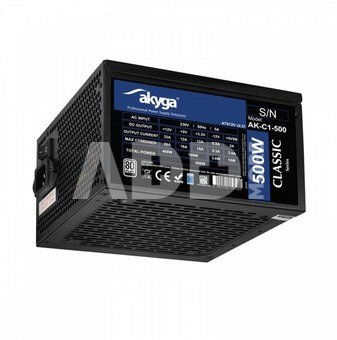
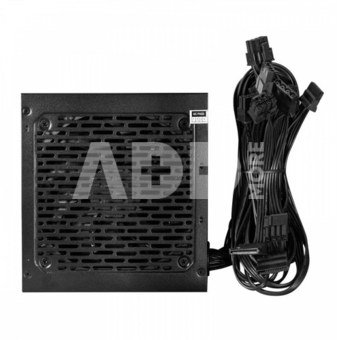
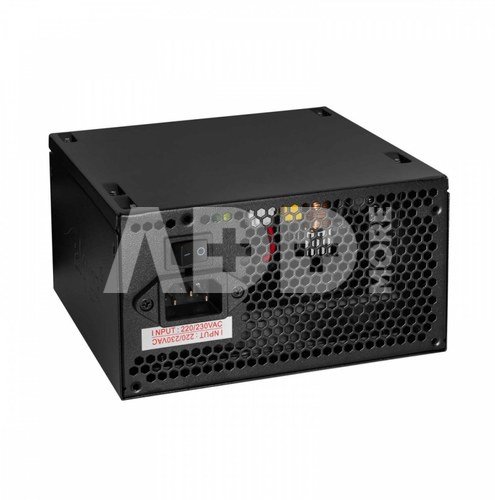
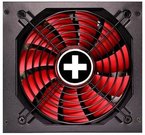
AKYGA AK-C1-500 ATX 500W PRO SERIES

AKYGA AK-C1-500 ATX 500W PRO SERIES
Kodas: 19195ABL
Gamintojo kodas: -
Įsiminti
EU sandėlyje
Pristatymas 10-14 d.d.
Pasirinkite savybes
Spalva
53.00
Nuomoti(nuo €/diena)
Pratęsta garantija
Prekės draudimas

Nemokamai atsiimkite Kaune, parduotuvėje (Birželio 23-iosios g. 23g) Birželio 23 d.

Nemokamai atsiimkite Klaipėdoje, parduotuvėje (Taikos pr. 17) Birželio 23 d.

Pristatysime į namus per kurjerių tarnybą Birželio 25 d.

Turite klausimų? +370 462 46444 Siųskite užklausą

AprašymasAKYGA AK-C1-500 ATX 500W PRO SERIES aprašymas

ATX 500 W Power Supply - The Heart of Your Computer

The Akyga AK-C1-500 ATX power supply from the Classic series is an essential component in the construction of your desktop computer. It is characterised by its high stability and efficiency in accordance with the 80+ standard. This makes it the right choice for users expecting high performance and reliability in PC power supply.

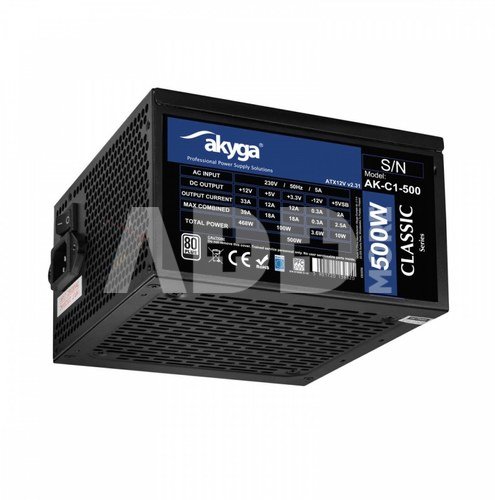
The AK-C1-500 ATX power supply meets the requirements of advanced computer systems. Its 500 W actual power output meets the needs of users looking for high energy efficiency and performance. With the needs of advanced configurations in mind, this power supply delivers 468 W of power on the +12 V line, which is crucial for systems that make intensive use of this line. Installation flexibility is further enhanced with cable lengths ranging from 45 to 75 cm, making it easy to deploy inside a variety of enclosures, even those with bottom-mounted PSUs.

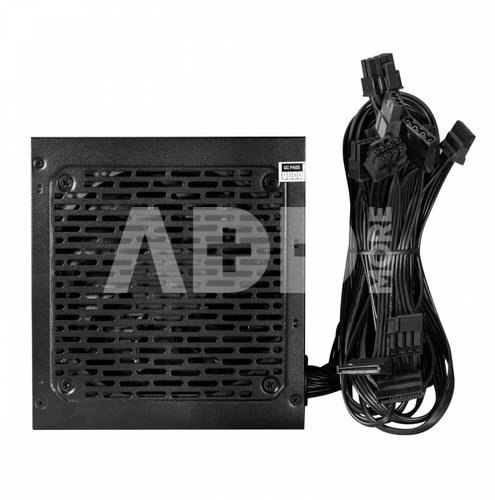
What's more, a low-noise 12 cm fan has been implemented in the ATX power supply, which efficiently cools the unit while maintaining a low noise level. This is extremely important for systems that are heavily used, guaranteeing stable operation without overheating.

Certification compliance

The product is 80 PLUS certified, which indicates its high energy efficiency. This means that the power supply has minimal power losses, which contribute to increased energy savings and reduced heat generation.

The power supply is equipped with a number of protection mechanisms, such as OVP, UVP, SCP, OPP, and OCP, which guarantee protection against overvoltage, voltage drops, overload, short-circuit, and current overload. These protection mechanisms not only protect the power supply, but also ensure the safety of the connected components.

OVP protection - Protects the power supply from excessive voltage on the output line. Activates when the voltage increases by 15% from the nominal value.

OCP protection - Protects computer components from excessive output current. In the event of an overload of any of the lines, the PSU will automatically shut down.

OPP protection - Protects against power supply overload. Activates when the power demand is higher than the peak power of the power supply.

OTP protection - Protects against overheating of the power supply, resulting from both overload and insufficient air circulation. If the safe temperature is exceeded, the power supply is automatically switched off.

UVP protection - Protects against under-voltage on the output lines. It activates when the voltage falls below the permissible value. The power supply is automatically switched off.

SCP protection - Protects the power supply from damage caused by a short circuit. The power supply is automatically switched off if a short circuit is detected.

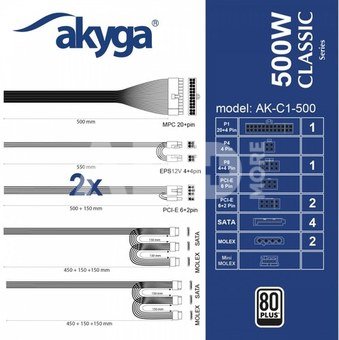
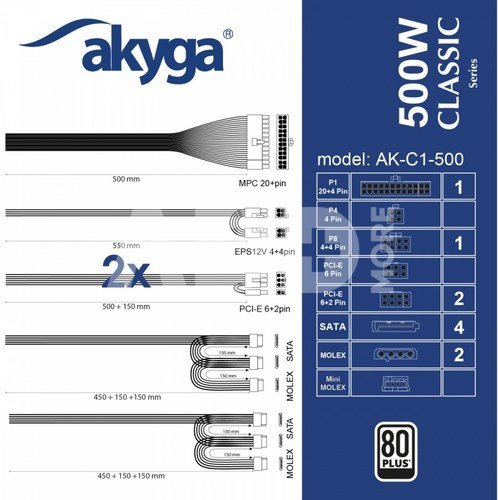
The AK-C1-500 ATX PC power supply offers an extensive set of connectors. A P4+4 connectortwo PCI-E 6+2 pin connectorsfour SATA connectors and two Molex connectors are available to connect multiple components such as hard drives, SSD drives, graphics cards and other peripherals. These connectors are placed on flat cables, a feature that is particularly appreciated by users due to the ease of cable organisation inside the PC case. This translates into better airflow and simplifies the process of building or upgrading a system. Flat cables are less likely to get tangled, which further facilitates tidiness and aesthetics inside the case.

The power supply unit consists of modern electronic components that comply with the latest technological standards. Carefully selected components guarantee the durability and stability of the device. They have been developed for long-term and intensive use, which ensures reliable system operation.


Garantinis laikotarpis 24 mėnesių

Svoris 1.32 kg

Pristatymo laikas 10-14 d.d.

Aptarkite su konsultantu Kaune

Neturime Kaunas Adresas: Birželio 23-iosios g. 23g Darbo laikas: I-V 09:00 - 18:00 VI-VII nedirba Telefonas: +370 674 59488
Kaunas

Aptarkite su konsultantu Klaipėdoje

Neturime Klaipėda Adresas: Taikos pr. 17 Darbo laikas: I-V 10:00 - 19:00 VI 10:00 - 14:00 VII nedirba Telefonas: +370 604 43972
Klaipėda
Specifikacija
Gamintojas(?) AKYGA
Garantinis laikotarpis 24 mėnesių
Svoris 1.32 kg
Pristatymo laikas 10-14 d.d.
Prekės kodai

19195ABL 5901720139320

Atsiliepimai

0 vidutinis įvertinimas (0 įvertinimų)

 0
 0
 0
 0
 0

Palikite atsiliepimą

Vertinti gali tik prisijungę vartotojai.

Palikti pirkėjų atsiliepimai (0)

Atsiliepimų kol kas nėra. Būk pirmas!

1. Kaip pasirinkti tinkamą klaviatūrą ir pelę savo kompiuteriui?

Norint pasirinkti tinkamą klaviatūrą ir pelę savo kompiuteriui svarbu atsižvelgti į asmeninius poreikius ir naudojimo būdą. Klaviatūros pasirinkimas priklauso nuo jūsų darbo pobūdžio, ergonominių poreikių ir asmeninio komforto. Jei daug laiko praleidžiate rašydami, svarbu rinktis klaviatūrą su maloniu klavišų paspaudimu ir ergonomišku dizainu, kuris sumažina rankų ir pečių įtempimą. Specializuotos klaviatūros, kuriose yra papildomų funkcijų, pavyzdžiui, programuojamų klavišų arba spalvotų šviesų, gali pagerinti naudotojo patirtį. Pelės pasirinkimas gali priklausyti nuo jūsų darbo pobūdžio – grafikos dizaineriams arba žaidimų entuziastams gali reikėti aukštos raiškos ir didelio jautrumo pelės. Ergonominės pelės su daugiau nei vienu mygtuku gali palengvinti darbą su įvairiomis programomis. Be to, svarbu atkreipti dėmesį į sąveiką su jūsų kompiuterio tipu (ar tai belaidė, ar laidinė klaviatūra ir pelė) bei patogią ergonomiją. Prieš perkant, būtina išbandyti klaviatūrą ir pelę, kad įsitikintumėte, jog jos atitinka jūsų poreikius ir yra patogios naudoti.

2. Kokios yra geriausios aušinimo sistemos kompiuteriui?

Geriausią aušinimo sistemą galima pasirinkti atsižvelgiant į kompiuterio naudojimo scenarijų. Vandens aušinimas dažnai būna efektyvus, ypač esant dideliam apkrovimui, o oro aušinimas yra paprastesnis ir pigesnis variantas. Keletas populiarių aušinimo būdų apima: 1) Oro aušinimas (Air Cooling): Paprasta ir ekonominė alternatyva, naudojanti didelius ventiliatorius, šilumos vamzdžius ir radiatorius. Šis būdas tinka vidutinio ir žemo lygio naudotojams. 2) Vandens aušinimas (Liquid Cooling): Ši sistema naudoja specialų šilumos siurblių ir vamzdžių rinkinį, leidžiantį aušinti komponentus vandeniu. Tai dažnai naudojama su pažangesniais procesoriais ir vaizdo plokštėmis, tačiau reikalauja tikslaus diegimo. 3) Phase Change Cooling: Labai efektyvi sistema, kuri naudoja šaltus dujų ciklus, kad transformuotų dujas į skysčius ir atvirkščiai. Tai brangesnė alternatyva, bet suteikia itin efektyvų aušinimą. 4) Termoelektrinė (Peltier) sistema: Šio tipo sistema naudoja Peltier elementus, kurie gali perkelti šilumą iš vienos pusės į kitą, priklausomai nuo elektros srovės krypties. Ši sistema gali būti derinama su kitomis aušinimo metodikomis. Geriausią pasirinkimą lemia naudojimo atvejis, biudžetas ir pageidaujamas efektyvumas. Priklausomai nuo to, ar norite paprasto, bet patikimo oro aušinimo, ar pažangesnės technologijos su vandeniu, turite rinktis tai, kas geriausiai atitinka jūsų poreikius.










