






+370 462 46444
I-V 10:00-19:00
VI 10:00-14:00

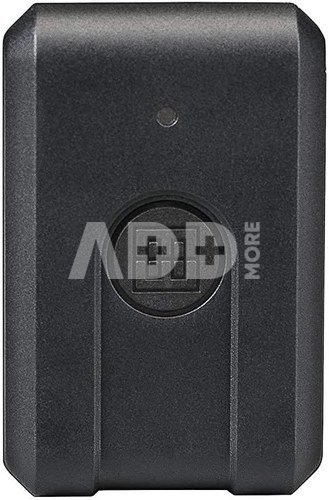
Elinchrom Studio-Software + Bridge

Elinchrom Studio-Software + Bridge
Code: 141366785VOK
Manufacturer code: -
Add to wishlist
EU warehouse
Delivery 5-10 w.d.
EAN
7630006320258
Choose properties
Color
105.00
Extended warranty
Product insurance

Pick up for free in the store in Kaunas (Birželios 23-iosios str. 23g) Liepos 13 d.

Pick up for free in Klaipėda, in the store (Taikos pr. 17) Liepos 13 d.

We will deliver to your home via courier service Liepos 15 d.

Turite klausimų? +370 462 46444 Send request

DescriptionElinchrom Studio-Software + Bridge description

Connect your world to the Elinchrom Studio App & Software
Speed up your workflow with the Elinchrom Studio and take control of your light wherever you are.


  • Control up to 20 units
  • Control individually or simultaneously (power, modelling lamp, sound, etc.)
  • 20 frequencies available
  • 4 groups with dedicated colors
  • Change unit group by drag and drop
  • Edit a friendly name
  • Save unit settings and reload them when required
  • Signal strength indications
  • Firmware indicator to inform if a new update is available


Elinchrom Studio
Control enabled Elinchrom units from your computer. Keep an overview of your lighting setup from the dashboard and quickly access each units’ most important settings even when they are out of reach. Any custom setup can be saved and reloaded when needed, saving you time for your next shoot.

Manage advanced settings from the Elinchrom Studio


  • Unit settings. User-friendly name, signal strength, stand-by mode, firmware indicator, and many more options are available to fine-tune your Setup.
  • Group settings. Drag and drop your unit to change into one of the 4 groups available.
  • Save & load setups. Save custom setups, saving you setup time for your next shoot.


Elinchrom Bridge
The key to open the Elinchrom Studio world. The Elinchrom Bridge (or an Elinchrom ONE or an Elinchrom FIVE) is the required link between Elinchrom units and the Elinchrom Studio App/Software.
Connect to a computer or a mobile device via Bluetooth to take full advantage of the Elinchrom Studio App/Software and your Elinchrom Setup.


Delivery time 5-10 w.d.

Discuss with a consultant in Kaunas

We don't have Klaipėda Address: Birželio 23-iosios g. 23g Working hours: I-V 09:00 - 18:00 VI-VII not working Phone: +370 674 59488
Kaunas

Discuss with a consultant in Klaipėda

We don't have Klaipėda Address: Taikos pr. 17 Working hours: I-V 10:00 - 19:00 VI 10:00 - 14:00 VII not working Phone: +370 604 43972
Klaipėda
Specification
Producer(?) Elinchrom
Delivery time 5-10 w.d.
Product codes

141366785VOK 7630006320258

Reviews

0 average rating (0 votes)

 0
 0
 0
 0
 0

Leave a comment

Only registered users can rate.

Customer reviews (0)

There are no reviews. Be first!

1. What are the best photo editing programs for professional use and why?

The best photo editing programs may vary depending on the user's needs and experience level. For professional use, the following programs are often recommended. Adobe Photoshop: This is one of the most popular and powerful photo editing programs. Photoshop provides comprehensive features that allow users to create professional-level photos, perform retouching, adjust colors, and more. It also has many plugins and capabilities. Adobe Lightroom: Great for organizing photos and performing basic editing tasks. This program is highly effective when managing large photo collections, and its features include color corrections, tone adjustments, and more. Capture One: This program is also frequently used by professional photographers. It offers more detailed color corrections and works with RAW format photos. DxO PhotoLab: This is an excellent photo editing program that produces outstanding results, especially because it automatically corrects lens distortions and other defects. Affinity Photo: Many professional users choose Affinity Photo as an alternative to Photoshop, as it offers powerful editing capabilities at an affordable price. All of these programs have many features that allow users to create high-quality photos and properly edit their aesthetics. However, it is important to consider which program best matches your individual needs and skills.

2. What is the difference between Adobe Premiere Pro and Adobe Premiere Elements video editing programs?

Adobe Premiere Pro is a professional-grade video editing program designed for experienced users and professionals, offering advanced capabilities, multi-layer editing, and top-quality video. It is a professional-level video editing program often used for creating films, TV shows, and other professional projects. Adobe Premiere Pro offers broad capabilities, including a professional workflow, many tools for effects, transitions, and color correction, as well as various audio editing options. Adobe Premiere Elements is a lighter version designed for beginners and intermediate users. It provides simpler tools but remains efficient and can meet most users' needs. Adobe Premiere Elements is more often used for non-commercial purposes, especially for those who do not require high levels of professionalism.